
Manuals & troubleshooting
Sometimes things don't work as expected or as they should. Find manuals and tips on troubleshooting here
Manuals
To access television channels, TV shows as well as films you need to:
1. Switch on the television - it will automatically load the TV stick. If it doesn't, look for "Amazon Firestick" and/or make sure you are in HDMI
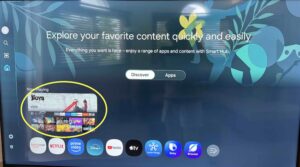 or
or 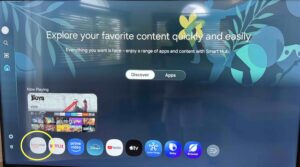
2. Once the firestick has loaded look for “KAI” (grey icon with white and blue letters) and access it
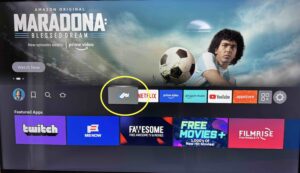
3. Then choose the type of entertainment you wish to watch.
Download a detailed step-by-step guide here.
If you can't access the firestick or can't get it to work please check the "Troubleshooting the television" section below. If that did not help please contact us via WhatsApp for help.
Note that as the television is a smart TV it also offers access to Netflix and Amazon Prime. If you prefer these services you can log in with your own account.
1. Close all doors and windows
2. Switch on your airco by pressing on the orange button on the white remote control in your bedroom. The temperature will be shown on your airco unit in Celsius, as well as on the remote.
3. To lower or increase the temperature press respectively on the down or up button until you have reached your desired temperature.
4. The airco wall unit has a LED display showing the temperature. This is quite bright at night-time. You can turn the LED display off by pressing the “LED Display” button. Note that the unit will still work as usual.
5. When you go to bed it is recommended to press the sleep button (just underneath the orange button) so that you don’t wake up in the middle of the night feeling cold.
6. When you leave the apartment please switch off the air-conditioning. The units work really well and will get your room back to your desired temperature in no time when you switch it on again.
NOTE: For short term stays (less than 28 nights), an electricity quote is included, which is enough for normal electricity usage. However, if you choose to use the air conditioning for extended periods of time or with doors and/or windows open, you will go over and the difference will be charged.
Sometimes it's very humid even though it's not very hot. You can then run the air-conditioner as a dehumidifier.
Select the "dry" mode on the remote and run at a similar or slightly lower temperature as the outside temperature.
Please do switch off the air-conditioner when you are not in the apartment. These units are sufficiently efficient to bring your apartment back to your desired temperature / humidity level.
NOTE: For short term stays (less than 28 nights), an electricity quote is included, which is enough for normal electricity usage. However, if you choose to use the air conditioning for extended periods of time or with doors and/or windows open, you will go over and the difference will be charged.
Some coffee machines already have a filter integrated into the machines, in others you need to add a paper filter.
If your coffee machine has a small filter basket it means you do not need to use any paper filters. If your coffee machine doesn’t have a small basket, you will be able to find paper filters next to the coffee cups in the cupboard.
1. Add a paper coffee filter in the appropriate recipient. Or if your machine has a small basket, skip this step.
2. Add ground coffee into the filter (be it a paper filter or the little basket). Use 1 to 2 tablespoons for one cup of coffee.
3. Add potable water in the water compartment at the back. You can measure the water by using the lines on the coffee pot and pouring it into the compartment behind the filter basket. Put the coffee pot back on the warming plate.
4. Plug in the coffee maker and turn it on
5. Wait until the coffee is completely brewed before consuming
6. Turn off the coffee machine and unplug the machine. Immediately toss the paper coffee filter away or if the machine has an integrated filter basket, throw out the coffee and rinse the basket. Enjoy your coffee!
The stove and oven (not all apartments have an oven) work with gas. Use the matches provided to light the hobs, by pushing in and turning the corresponding knob.
For your safety, it's best to use an uncooked spaghetti to light the oven. Open the door to the oven and locate the hole at the bottom front of the oven, light one end of the uncooked spaghetti and hold the flame by the hole while pushing in and turning the knob of the oven.
Troubleshooting the television
To check whether you are in the right source (HDMI) press the home button on the television control and go to source.
Then click on HDMI and the main screen of the TV stick will load. Here you will need to choose "KAI" (grey icon with white and blue letters) for the TV stick to work.
Download a detailed step-by-step guide on how to navigate the TV stick here.
If you switch on the television and you get a black screen with a number 3 on the right hand side of the screen then you need to change the source.
To do so press the home button on the television control and go to source.
Then click on HDMI and you should be able to see the first screen of the TV stick. Here you will need to choose "KAI" for the TV stick to work.
Download a detailed step-by-step guide on how to navigate the TV stick here.
Sometimes, even though the TV is in the right source (HDMI -> TV stick), it shows that there are "no connected devices".
Switch off the television for at least two minutes and retry.
If the issue persists, look behind the television on the right side. You will see a stick in one of the USB ports. Unplug it and plug it back in in the same USB port after two minutes. This should reset the stick and solve the problem. Once back in the stick, go to "KAI" to watch films, TV shows or television channels.
Download a detailed step-by-step guide on how to navigate the TV stick here.
Sometimes, when you are in "KAI", TV channels or other content won't load and you will see a circle that keeps on turning. Switch off the television for at least two minutes and retry.
If the issue persists, look behind the television on the right side. You will see a stick in one of the USB ports. Unplug it and plug it back in in the same USB port after two minutes. This should reset the stick and solve the problem. Once back in the stick, go to "KAI" to watch films, TV shows or television channels.
Download a detailed step-by-step guide on how to navigate the TV stick here.
We provide an overall entertainment service called “KAI” that groups together a wide range of television channels, TV shows as well as films.
As the television is a smart TV it also offers access to Netflix and Amazon Prime. If you prefer these services you can log in with your own account. Sometimes previous guests have not logged out of their account before leaving. To be able to log in you first need to log them out.
Make sure you are in HDMI instead of TV.
To check, push the button with the home symbol, scroll left and go to "source" or "connected devices", then click on HDMI. You should now be connected to the TV stick.
To see the main option screen of the TV stick scroll to KAI and click on it.
Download a detailed step-by-step guide of how to navigate the TV box here.
Make sure the television is switched on. When switched on a small red light will show on the bottom of the television.
Sometimes the batteries of the remote need changing, which may be why the television won't switch on. We will gladly change batteries during office hours from Monday to Friday. Outside of these times you can try to move the batteries inside the control and they will usually work again for a little while longer.
Make sure the volume is not very low or on mute. Turn up the volume with the remote control keeping in mind that to operate the volume button you need to press forward and backward rather than push on it.
Sometimes, when you are in "KAI", you can watch films, TV shows or TV channels but there is no sound. Switch off the television for at least two minutes and retry.
If the issue persists, look behind the television on the right side. You will see a stick in one of the USB ports. Unplug it and plug it back in in the same USB port after two minutes. This should reset the stick and solve the problem.
Download a detailed step-by-step guide on how to navigate the TV stick here.

